AION 2 Steam vs PURPLE: Same Servers and Account Linking
You can play AION 2 Global on Windows PC through Steam or through PURPLE, NC's own launcher. Both give you the same game on the same servers. The real differences are the store you pay through and how you sign in. This page covers those differences, how to link a Steam account to an NC account, and how to take one character back and forth between the two launchers.
TL;DR
- Same game, same servers. NC says in-game content is identical on Steam and PURPLE, and players on both share the same servers.
- You don't need PURPLE to play on Steam. Linking is optional. You only need it if you want the same character and progress on both launchers.
- Steam character → PURPLE: open PURPLE and choose the Steam login option with the same Steam account.
- PURPLE character → Steam: if you signed in to PURPLE with Steam, just launch on Steam. If you used an NC account or another login, link Steam to that NC account first (Manage Login → Steam → Link).
- The one real lock is the Founder's Pack. A pack, including its Early Access, works only on the platform you bought it on.
- Paying is different. Steam uses your Steam Wallet. PURPLE takes direct payment through Xsolla (mileage can be combined) and checks out in USD only.
Short answer: what's the same and what isn't
NC's launch FAQ answers the two big questions directly: the in-game content is the same for Steam and PURPLE users, and Steam and PURPLE players share the same servers. There's no "Steam server" or "PURPLE server" to pick between, so choose the launcher you prefer.
Linking is optional too. You can play on Steam without ever making a PURPLE account. Linking only matters if you want the same character on both launchers.
Seen "you must play through Steam if you bought on Steam"? That's only true for the Founder's Pack. NC says a Founder's Pack can be played only through the platform it was bought on (Steam to Steam, PURPLE to PURPLE), and its Early Access has no cross-platform access. Your character itself isn't stuck there: with a Steam login or a linked account, NC's help articles show how to play the same character on both Steam and PURPLE (steps below).
Steam vs PURPLE at a glance
| Steam | PURPLE | |
|---|---|---|
| Game content | Same as PURPLE | Same as Steam |
| Servers | Shared with PURPLE players | Shared with Steam players |
| Sign-in | Your Steam account | NC account, Steam login or another supported login |
| Paying for items | Steam Wallet | Direct cash payment through Xsolla, in USD only (your bank may ask for a one-time 3-D Secure check). PURPLE mileage can cover all or part of it |
| Listed prices | May differ from PURPLE | NC's listed prices are based on the PURPLE store |
| NCoin | Can't buy Quna or premium items | Can't buy Quna or premium items |
| Founder's Pack | Playable only on Steam. One pack per account per platform | Playable only on PURPLE. One pack per account per platform |
| Upgrading a Founder's Pack (while packs are on sale, until Oct 5, 08:00 PT) | No direct upgrade: refund, then buy the higher tier | Upgrade directly and pay only the difference |
| Founder's Pack refunds | Through Steam, under Steam's refund policy | Through PURPLE, under its refund policy |
Steam and PURPLE Founder's Packs are separate purchases, and buying on both doesn't combine them. For tier contents, binding and refund details, see the Founder's Pack guide. For what the in-game shop and membership cost, see free to play and membership.
How to link your Steam account to an NC account
There are two ways to link, each from an NC help article.
Option A: PURPLE website (Manage Login), from NC's article How can I link my Steam account to an existing NC account?
- Go to purple.plaync.com/game/aion2global.
- Click the profile icon at the top right and Sign in.
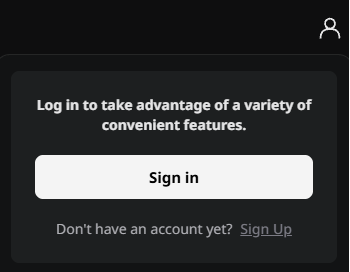
- Open login management, then Account.
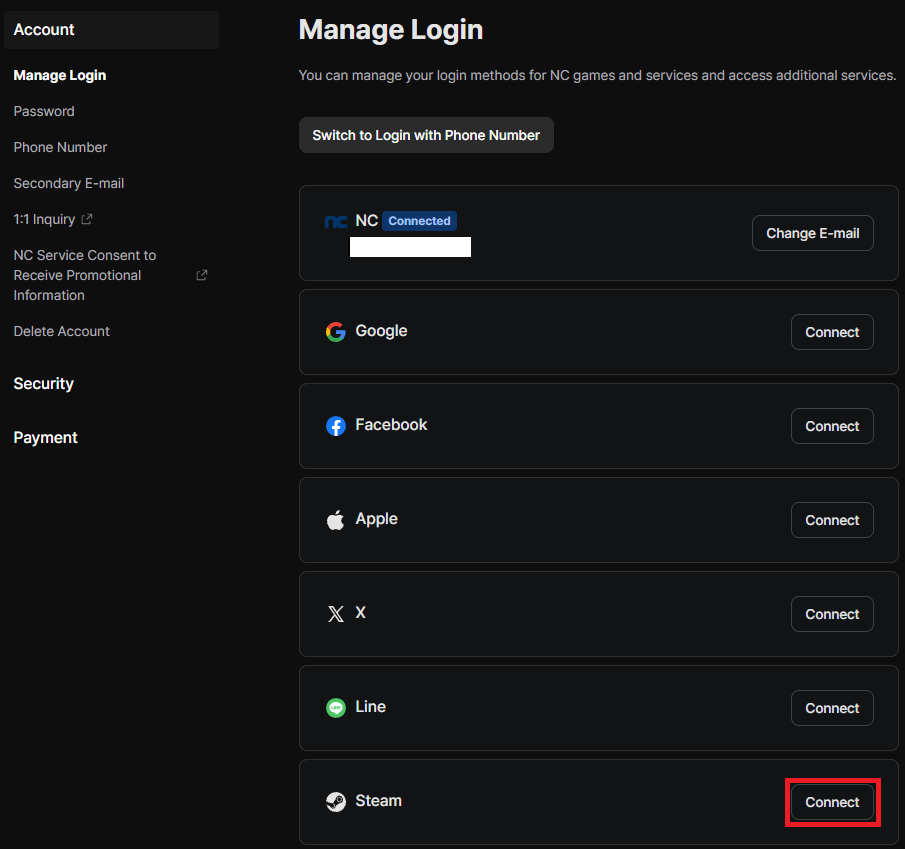
- On the Manage Login page, find Steam and click Link. (In NC's screenshot, the button reads Connect.)
- Sign in with the Steam account you want to link and finish the prompts.
Option B: nc.com (My Page), from NC's article Can I play my PURPLE character on Steam?
- Sign in at nc.com with the NC account that owns your AION 2 character.
- Go to My Page → Account Linking.
- Follow the prompts to link your Steam account.
Check your linked logins in game
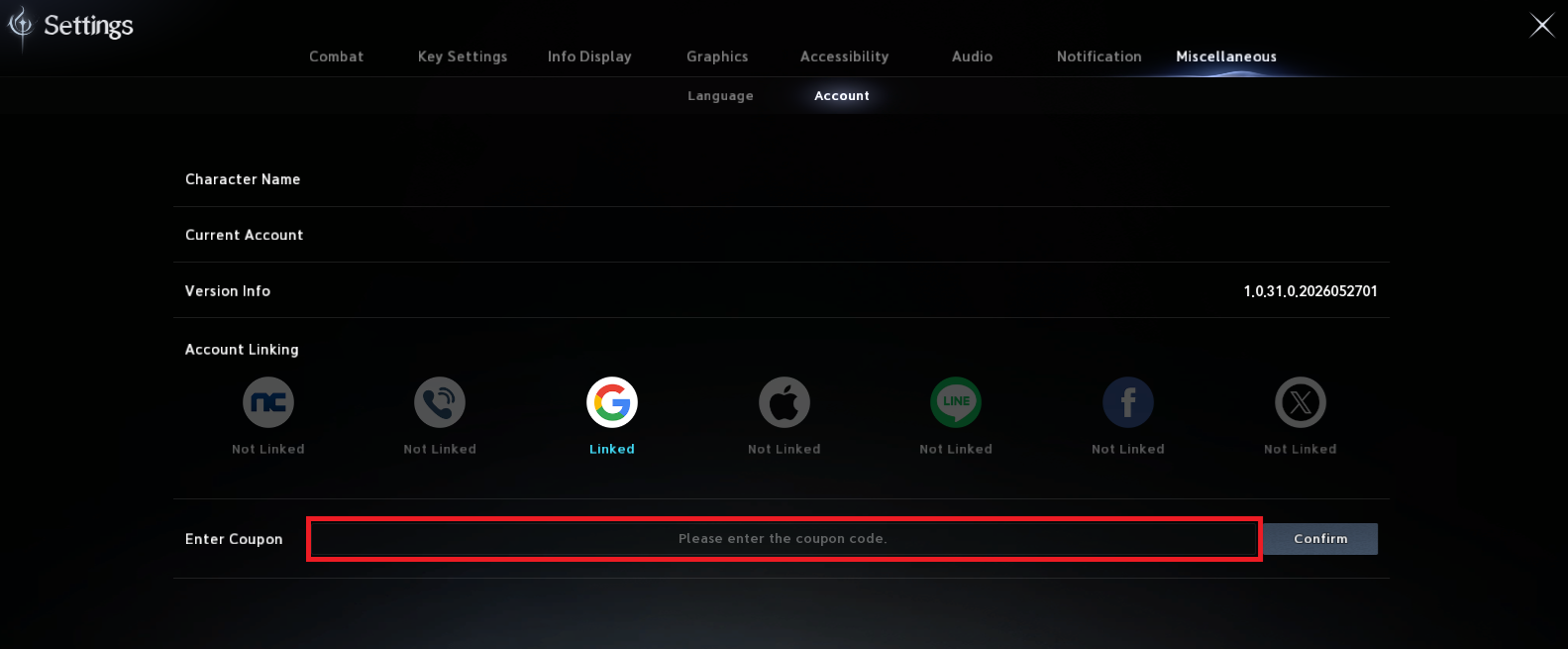
Inside AION 2, Settings → Miscellaneous → Account has an Account Linking row that shows which login methods are linked to the account you're playing on.
Play your Steam character on PURPLE
If you made your character on Steam, you can open the same character in PURPLE. You don't need to create a new one. (NC article: Can I play my Steam character on PURPLE?)
- Download and open PURPLE.
- Pick the Steam login option.
- Sign in with the same Steam account your character is on.
- Launch AION 2. Your existing character is there.
Play your PURPLE character on Steam
How you do this depends on how you signed in to PURPLE. (NC article: Can I play my PURPLE character on Steam?)
| How you signed in to PURPLE | What to do |
|---|---|
| With Steam | Launch AION 2 through Steam with the same Steam account. Nothing else is needed |
| With an NC account or another login | Link Steam to that NC account first (Option A or B above), then launch AION 2 through Steam |
How to unlink Steam
From NC's article How do I unlink my NC account from Steam?:
- Go back to the Manage Login page on the PURPLE website (same path as Option A).
- Click Disconnect next to Steam.
Once it's disconnected, you can link the NC account to a different Steam account.
Can't log in? Account conflicts and launch errors
NC account vs PLAYNC account. These are two separate accounts. If both are registered with the same email address, an account conflict can block you from signing in. NC's fix is to change the email address on your NC account. NC's Account Conflict Solutions article walks you through it.
Steam error 1138:100134 at launch. NC has a dedicated help article for this error code.
Linking not working? NC has said it is looking into reports of account-linking issues. See NC's notice "Update on account issues and in-game fixes" and the AION 2 notice board for the latest status before you try again.
Still stuck? Support for AION 2 Global goes through NC's help center (help.plaync.com). Start with the articles linked on this page.
Southeast Asia: set PURPLE's region to Global
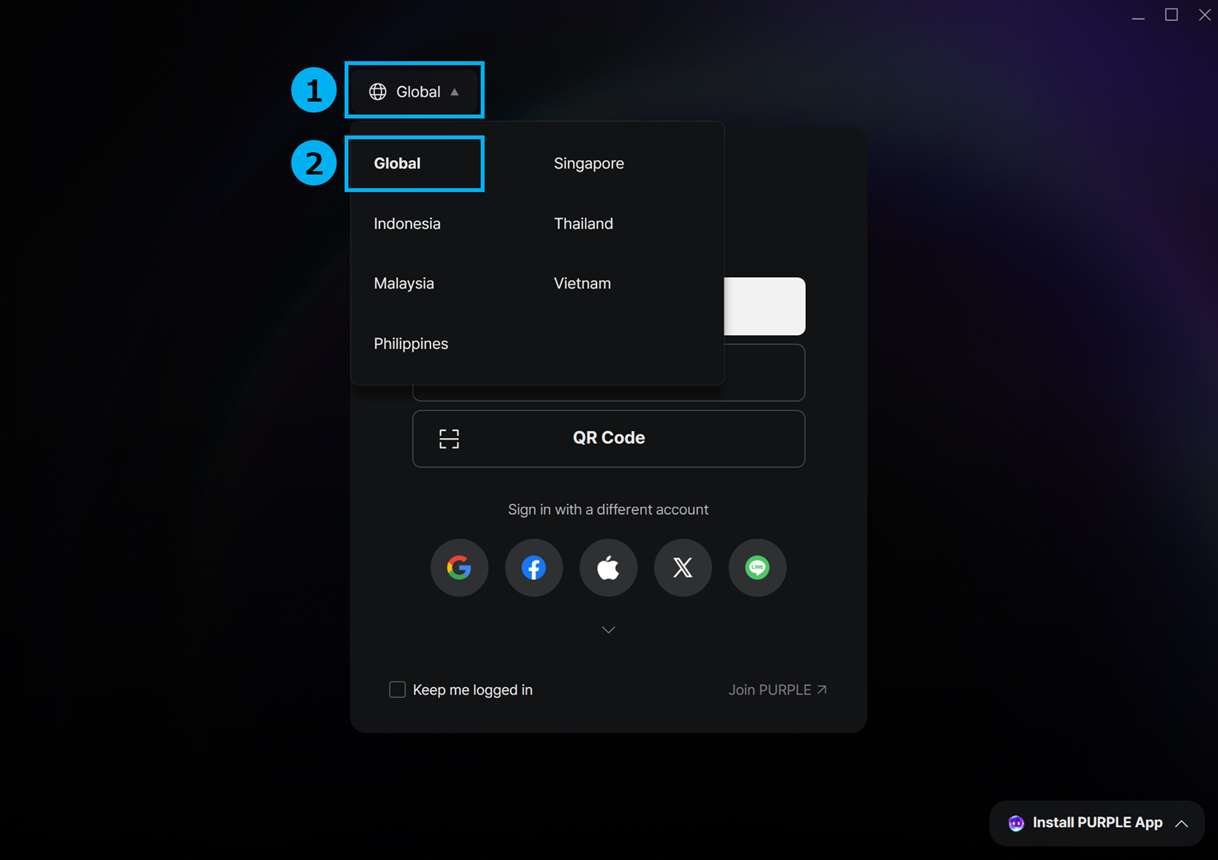
If you play from Indonesia, Malaysia, the Philippines, Singapore or Thailand, NC says the PURPLE login region has to be set to Global. Otherwise AION 2 may not show up in your game list. The region menu is at the top of the PURPLE login window.
Restricted countries
This applies to both launchers. NC's help article What countries are restricted in Aion 2? lists the countries where AION 2 Global can't be played and where NC can't take payments:
- China, Hong Kong, Macau and Taiwan
- Republic of Korea
- Vietnam
- Russia and Belarus
- Belgium and the Netherlands, plus Curaçao, Bonaire, Saint Maarten and Aruba
- Serbia and Slovakia
- Cuba and Syria
Progress from the Korean or Taiwanese versions doesn't carry over to Global either. See Global vs Korea for the other differences.
FAQ
Do I need a PURPLE account to play AION 2 on Steam? No. You can play on Steam without a PURPLE account. Linking is only needed if you want the same character on both launchers.
Is Steam or PURPLE better for AION 2? Neither gets different content or different servers. The choice comes down to which store you'd rather pay through (Steam Wallet, or PURPLE with Xsolla and mileage) and which launcher you like.
Are Steam and PURPLE players on the same servers? Yes. NC's launch FAQ says Steam and PURPLE players share the same servers.
Can I switch from Steam to PURPLE later without losing my character? Yes. In PURPLE, pick the Steam login option and sign in with the same Steam account. Going the other way, from PURPLE to Steam, may require linking first (see the table above).
Does a Steam Founder's Pack work on PURPLE? No. NC says a Founder's Pack can be played only through the platform it was bought on, and Early Access has no cross-platform access. Steam and PURPLE packs are separate purchases.
Can I upgrade my Founder's Pack? While packs are on sale (until Oct 5, 08:00 PT): on PURPLE, yes, choose the higher tier and pay the difference. Steam has no direct upgrade, so you'd refund and buy the tier you want.
How do I unlink Steam from my NC account? On the PURPLE website, open Manage Login and click Disconnect next to Steam. You can then link a different Steam account.
I get an account conflict when I sign in. What do I do? NC and PLAYNC accounts are separate. If both use the same email, change the email address on your NC account, as NC's Account Conflict Solutions article explains.
Can I use NCoin in AION 2? No. NC says NCoin can't be used to buy Quna or other premium items.
Is AION 2 Global region-locked? It can't be played or paid for from the countries in NC's restricted list above. In some Southeast Asian countries, PURPLE also needs its region set to Global.
NC notices and help articles used on this page
- Launch FAQ: same content, same servers, linking optional
- Founder's Pack product notice: platform restriction
- PURPLE Region Settings for Login in Certain Countries
- Xsolla payment notice
- NC help center: How can I link my Steam account to an existing NC account?, How do I unlink my NC account from Steam?, Can I play my Steam character on PURPLE?, Can I play my PURPLE character on Steam?, Account Conflict Solutions, What countries are restricted in Aion 2?, How do I purchase items?, The currency is only shown in USD at checkout, Can I use NCoin to make purchases in Aion 2?, How do I upgrade my Founder's Pack?, Steam error 1138:100134